TrixietheTurfmaster

[2000 Lawn Mower] Mova Lidax 2000 Mapping Help

First, I would like to say how much I LOVE the 2000 after less than 30 days of use!!  I posted this question as a comment to another user - this may not be the best way to get my question answered...apologies!
  
I have a fenced/gated, rock bordered backyard with A LOT of bumps and moderate slopes. I used "Map 1" as my first try and manually mapped.  It has worked perfectly with no issues!  Trixie is a beast!!  *Side note, I did turn on the "ultra-trim" last night to try and get closer to the rock bordered edges...it does leave a noticeable 1.3 cm "scalped" cut - I might keep that for the back as it's not as noticeable for the "rock borders" but it's "ultra" noticeable in other areas* - easy turn on/turn off toggle switch in the App.
OK - Map 1 (enclosed backyard w/gates) complete, have used several times and once at night - perfect - did not have to interact at all!
- I created a new Zone for a front side yard with no nothing between my neighbor's yard - even created a pathway for Zone 1 (backyard) to Zone 2 (front side yard with fence gate open).  This also worked as I manually mapped but got stuck a couple of times around a giant tree/some roots I have, as well as turning "jumping" my not-even-to-the-sidewalk areas - this was my fault, I've since deleted Zone 2 and the pathway so I can "do better" today - again these issues were mine - not Trixie's - I don't anticipate making the same mistakes I did the first time - (fingers crossed) - so Zone 2 for Map 1 will be remapped today.

Now for Map 2 - this is my front yard and a small side yard with again, no nothing between the portion that is between my yard and my neighbor's yard.  Because I have to give access to Trixie via opening a fence gate and base station (the base station lives behind the locked gates in Map 1)...After successfully mapping Map 2 (not mowing, just manually mapping), I did as the manual suggested, and created a path (a long one) from Map 2 directly to the base station - most of the path is via my sidewalk(s), across the driveway, to the short grass path, thru the opened gate to the base station.  This works PERFECTLY - she did it the first time (including going back "home" via the path to recharge 75% thru Map 2) and all remaining times I've used thus far!!  LOVE IT!  Also LOVE that she calculates the time it takes to get to the base when recharge is needed...I noticed she will start mowing at the furthest point in the Map to be closest to the path "home" when recharge is needed!  Genius!

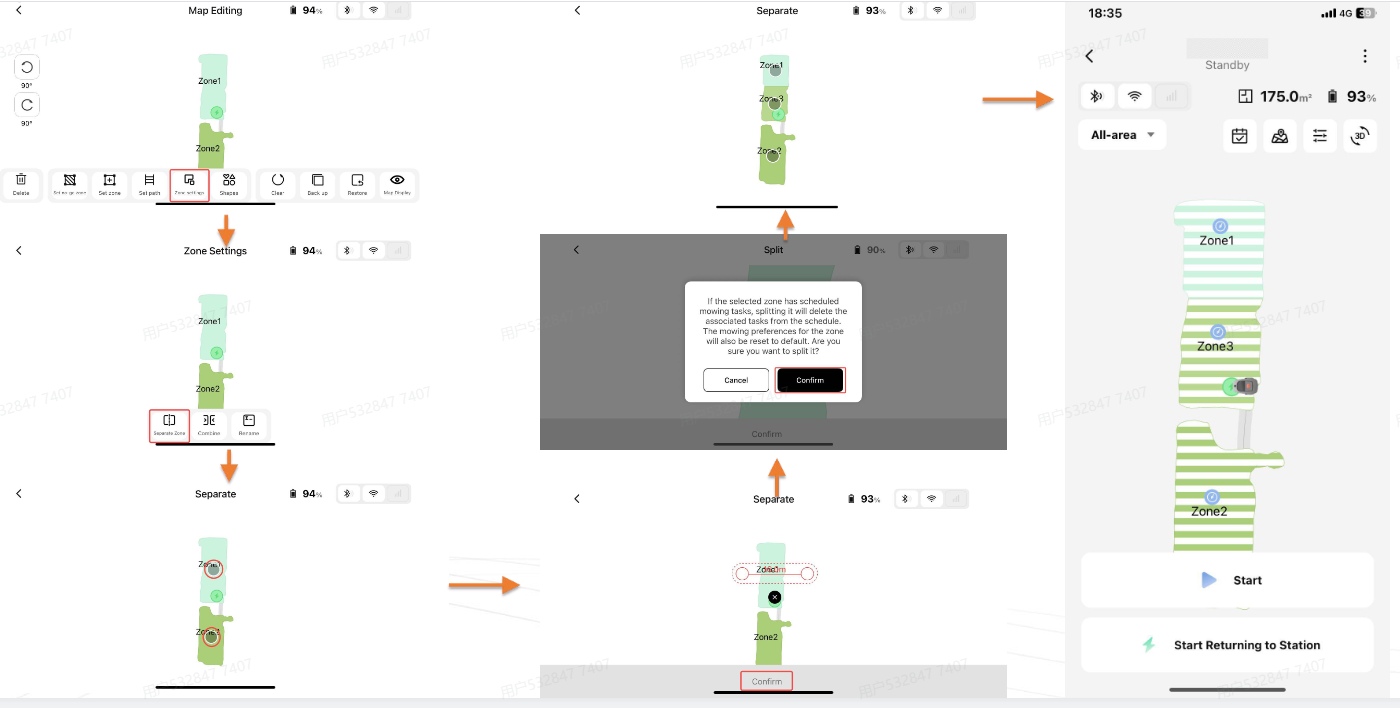
After all that, I have a question - I don't see anything in the manual or online comments of how to mow ONLY selected Zones (not Maps - ZONES within the map(s).  I will be creating a new ZONE for Map 2 (front) today.  It is the small "swath" between my front yard - sidewalk - with a curved curb to the street.  Because I did not initially include that in my first Map 2 - is there a way to mow ONLY Zone 2 of Map 2?  I know I'll have to create a path for Zone 2 from Zone 1 in Map 2 which I've proven I can do - haha - but I'm really hoping I don't have to delete Map 2 and remap!!  Anyone know if this is possible?  Zone specific mowing?  Without having to mow the entire Map?

Last - the only suggestion/"wish list" item I'd like to pose is making the font MUCH bolder with perhaps darker background on the App?  It's really difficult to see in sunlight - even shade in some cases.  Along with that is making the icons in the App MUCH larger with MUCH darker/bolder font.

I'm old - not a tech "idiot" but also not an expert.  I've never been a gamer (joysticks) much less on a phone - so that part - I'm training myself more than Trixie - she's been very tolerant of me thus far - haha - I'm also old enough (before smartphones) that I never learned to text with my thumbs - making it extra frustrating (for me) using my phone, "joysticks" with one thumb in the daylight with TEENY icons and fonts that are non-bolded...this is an issue us older "broads"!!   

Apart from my question and suggestion - I am absolutely in LOVE with my Mova Lidax 2000 - it's such a relief for me as I know it won't be much longer before I'm completely immobile - HIGHLY recommend to the older Mova users!
You need to log in to reply. Login | Register

12 Comment

IMG_5645.jpeg
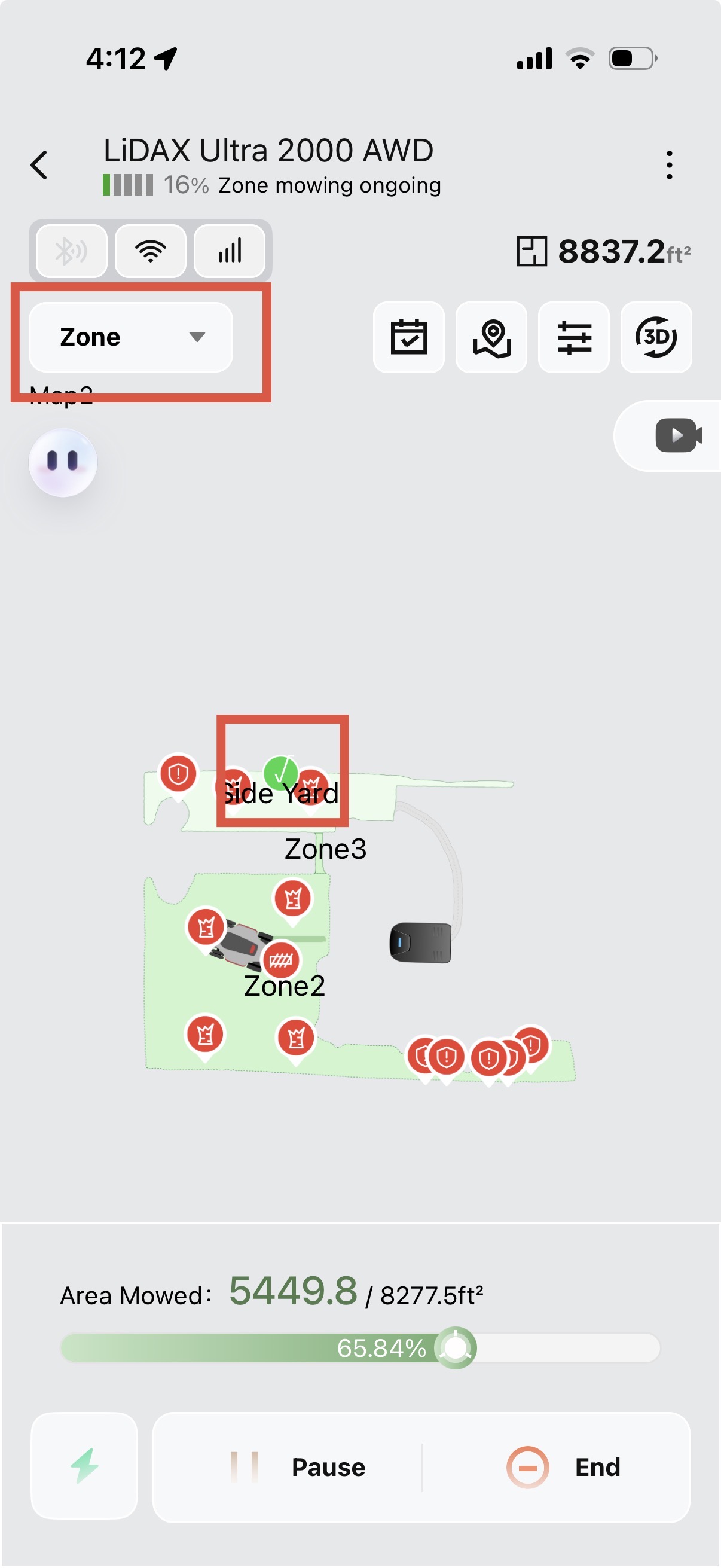
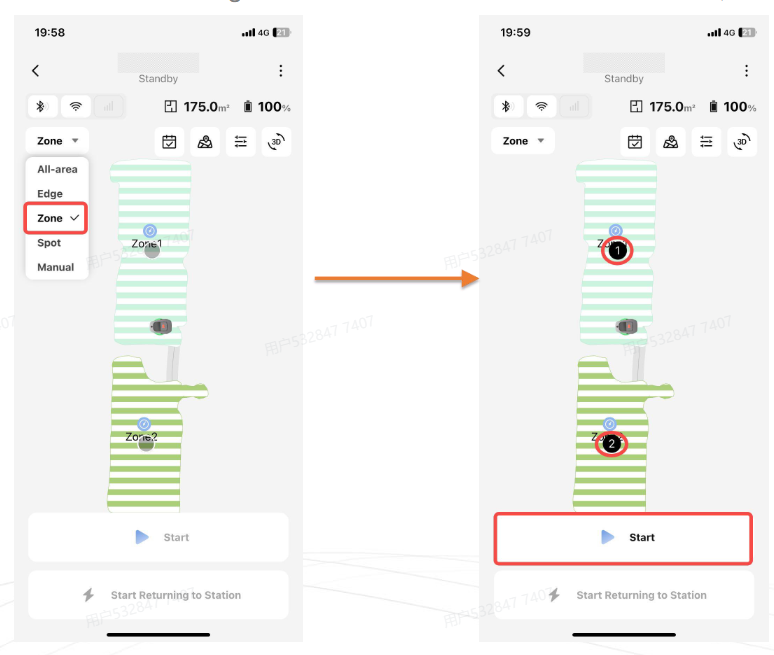
Hi! You can mow just a zone on a map. Select “Zone” in the top left and then make sure you check-mark the zones you want to mow before you start. This should do it for you!!

There is a survey going around for the app that you may be interested in taking.

Here is the direct link to the survey:[https://docs.google.com/forms/d/e/1FAIpQLSea5aQD1xB7NqbnG5b5zUgjxGRCBu9uE0sWxPXxPNUaPHvbZg/viewform?usp=dialog](https://docs.google.com/forms/d/e/1FAIpQLSea5aQD1xB7NqbnG5b5zUgjxGRCBu9uE0sWxPXxPNUaPHvbZg/viewform?usp=dialog)  
2026-5-18 04:15:56 US Translate

Re: Sending/posting a screenshot? I said in my first plea for help I'm not the tech expert YET - Trixie has her hands full with me - LOL
 
2026-5-22 07:23 US Translate
Thanks MovaKing! Took the surveys - appreciate your response...life happened, so I didn't get to remap the side yard, nor the "swath" however, this helps a lot! Thx!
 
2026-5-22 07:20 US Translate
My mova is not working on its scheduled time since I set it up. Do you have any ideas on how to fix
 
Hmmm, no. It shouldn’t need to charge first! The circles on the zones to select are a little light in color. Can you post a picture of your screen once you switch it to zone?
 
2026-5-18 08:11 US Translate
Thanks so much MovaKing! When I had a 2nd zone with Map 1 - I dropped the menu down, selected "Zone" and it didn't show me zone 1, zone 2 to select from...does it need to charge/return to base 1st?
 
2026-5-18 05:55 US Translate
选择区域割草.png
分割分割区域.png
Hello! First of all, thank you so much for taking the time to share your genuine experience using the LiDAX 2000. We are deeply moved and delighted that this machine provides you with such a convenient and comfortable user experience. Your high praise is our greatest honor!

We fully understand the complex terrain of your yard, with its many slopes, protrusions, and rocky edges. We appreciate your dedication in manually drawing maps, dividing the work areas, and planning routes to gradually learn how to use it. We also deeply admire the details you mentioned, such as the 1.3cm trimming marks in the extreme trimming mode, stable nighttime operation, intelligent calculation of return trip power, and priority trimming of distant areas. These details precisely match the machine's actual operating logic, demonstrating professionalism and meticulousness. We especially thank you for providing these practical insights.

Regarding your core concern—specifically, the ability to select individual areas for mowing within a single map—we are here to provide a clear answer: how to choose the desired trimming method for each area, and how to create a second map for partitioning. I will provide you with demonstration images for reference. This will be very convenient for you.

We have carefully noted your two valuable suggestions for improvement:

① Optimize the mobile app interface by increasing icon size, bolding fonts, and changing to a darker background to improve visibility in bright outdoor light and low-light conditions;

② Simplify the operation logic for middle-aged and elderly users, streamline the steps, reduce the learning curve, and adapt to the usage habits of this demographic.

We will compile and submit your feedback to the product development and app optimization teams for their consideration as soon as possible.

Thank you again for your sincere review and valuable suggestions. We wish you a pleasant life and smooth use of the app!
2026-5-18 16:12:21 US Translate

Thank you for your kind and detailed response MOVA Support!
 
2026-5-22 07:27 US Translate
My Mova Lidar 1000 does not work on its scheduled time. Any ideas on how to fix this issue.
2026-5-20 00:55:58 Translate

Me > Help & Feedback > Contact Us > Online Service.
 
2026-5-22 13:26 US Translate
If it happens frequently, upload the logs and contact online customer service for further assistance.For more support, provide your work order number or reach us via
 
2026-5-22 13:26 US Translate
Hello YN066109, Regarding the issue that the lawn mower sometimes fails to work as scheduled, we suggest you update its firmware to the latest version. Please note how often the problem occurs.
 
2026-5-22 13:25 US Translate
UID:HC012659 US
  • 9Posts
  • 0Friends
Privacy Policy|Terms of Use|Archiver|Mobile|DarkRoom|Software License and Service Agreement

© 2026 MOVA Forum All Rights Reserved | Support by Discuz! X5.0 Font by MiSans

Quick Reply Back to Top Return to List