OS677462

[P10 Pro Ultra] Vacuum will not dump

My vacuum will not dump the content that it collects. It returns to the base and sounds like it is dumping yet the contents remain. I have checked and nothing is in the collection bag. Is there a way to tell it to dump while it is at the base in order to "test" it?
Translate
You need to log in to reply. Login | Register

6 Comment

Image.jpeg
Please try the following troubleshooting steps:

* After emptying the dust bin, make sure the dust bin cover is fully closed and the dust bag is installed correctly.

* Verify that the dust chamber lid is properly installed and that the dust chamber is completely sealed.

* Check the dust bag and replace it if it is full before attempting the dust collection process again.

* Inspect the suction ports on the robot, dust bin, and docking station to ensure there are no blockages. Remove any debris that may be restricting airflow.

* You can also check the dust pipe inside the base station for any clogs or buildup that may be preventing proper dust collection.

* In the app, confirm that automatic dust collection is enabled. Also check whether Do Not Disturb mode is active, as this will prevent the robot from automatically emptying its dust bin. If needed, disable DND or adjust the schedule.

* Check the charging contacts on both the robot and dock. If they appear dirty, wipe them clean with a dry cloth or tissue.

* If your home tends to collect a lot of dust, consider increasing the automatic dust collection frequency in the app so the dust bin is emptied more often.

* If the debris being collected consists primarily of fibrous or fluffy materials, such as pet hair, lint, or similar particles, these can easily clog the air intake and are often difficult for the base station to clear completely. In these situations, manual cleaning of the affected area may be required, as the base station is typically unable to fully remove this type of debris.

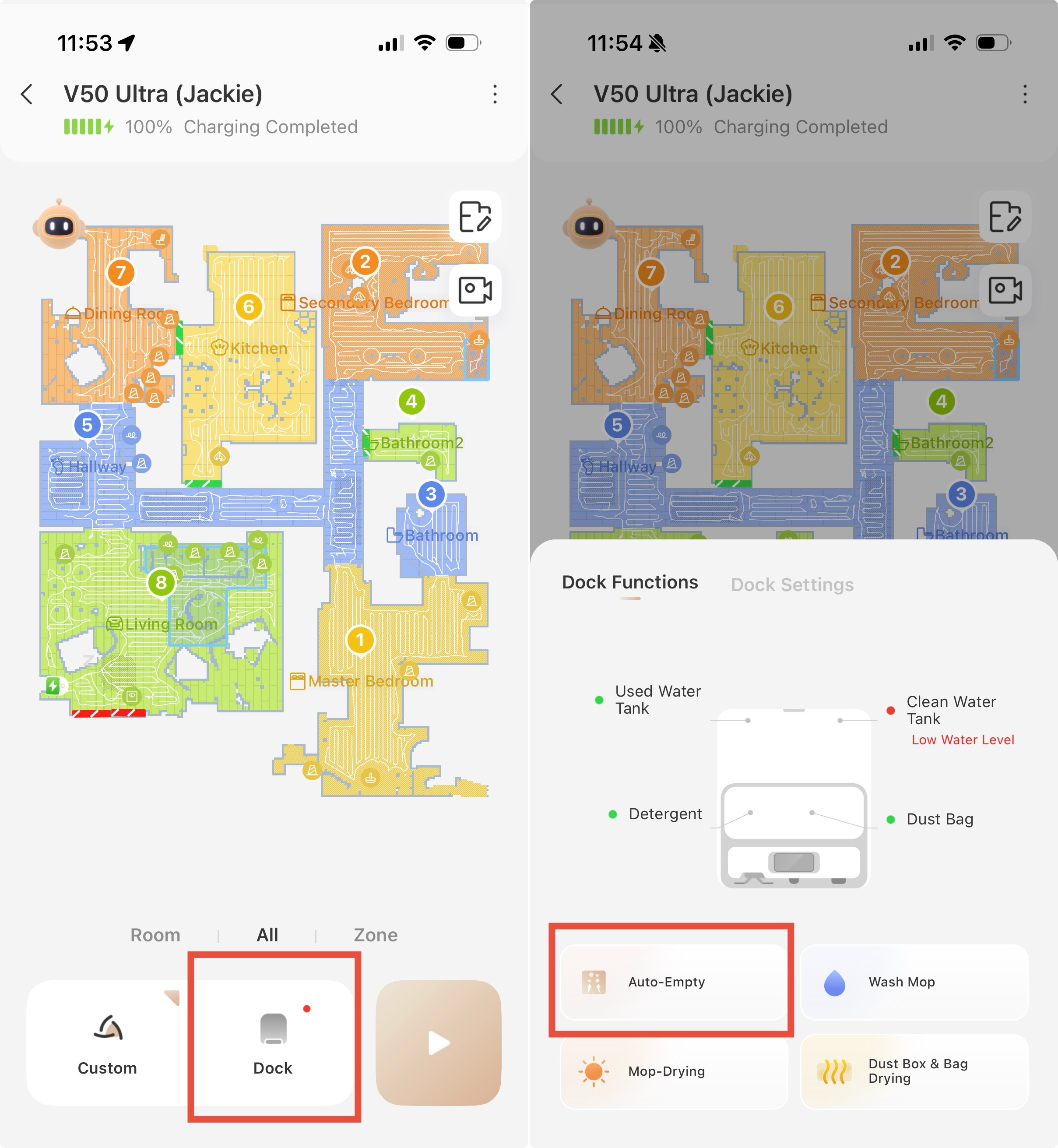
You can also test it by following the image instructions attached.
2026-6-17 23:58:13 US Translate

Sorry to hear this. Mova support should be able to assist by email at support@mova-tech.com There’s a chance something is wrong with the unit ☹️
 
2026-6-20 06:38 US Translate
I have tried these trouble shooting tips Mova King, and the dust bin still won't empty. Any other idea's Thank You
 
2026-6-20 02:28 US Translate
I have cleaned mine out and checked all places.  I just got mine.  I dint think it has ever emptied. There is nothing in the bag.  My sister has one and it is doing the same thing.
Sorry for the late reply. Please kindly try the troubleshooting methods mentioned in the comment section.
 
2026-7-3 18:14 US Translate
Hello OS677462,
We apologize for the inconvenience caused. Please follow the troubleshooting steps below:
Go to the "Automatic Emptying" settings and check the auto-empty frequency. The robot will automatically suck dust according to your set frequency.
Check if Do Not Disturb mode is enabled. When this mode is on, the base station will not run automatic dust collection. Go to "More Features" to turn off DND mode and try again.
The robot needs to show "Cleaning task completed" and return to the charging dock on its own. If the battery level is too low or there is manual interruption during charging, automatic dust collection will not trigger.
After cleaning finishes, you can manually tap the Dust Collection/Auto Empty button in the App to test if the dust collection function works.
If the dust collection activates yet dust cannot be sucked away:
Check whether the outlet of the dust bin is tangled with hair. Fluffy hair and lint are hard to extract, clog the air duct and affect fan performance. Please clean this area manually. Meanwhile, we suggest increasing cleaning and auto-empty frequencies to reduce dust buildup.
If the issue persists, please send a fault video, the device serial number and your purchase invoice to customer service for further support. Email: support@mova-tech.com
UID:OS677462
  • 1Posts
  • 0Friends

© 2026 MOVA Forum All Rights Reserved | Support by Discuz! X5.0 Font by MiSans

Quick Reply Back to Top Return to List