|
Hello, when encountering this issue, please try cleaning the radar sensor and the edge obstacle avoidance switch.
If your robot has messy cleaning paths during daily use, please check the following items:
Before cleaning: Tidy up scattered items on the floor such as power strips, toys, slippers, to avoid frequent collisions that cause disordered cleaning routes.
While cleaning: Clear foreign objects, dust or oil stuck in the bottom drive wheels in time, to prevent abnormal movement of the robot.
While cleaning: If the robot collides multiple times during operation, it will move along edges temporarily before returning to the zigzag cleaning pattern.
Frequent abnormal paths: Upgrade the robot firmware to the latest version, reset the map and rebuild the map from scratch.
For obstacle-avoidance models, wipe the sensor lens clean:
Restart your robot.
If the issue remains, perform a full system reset.
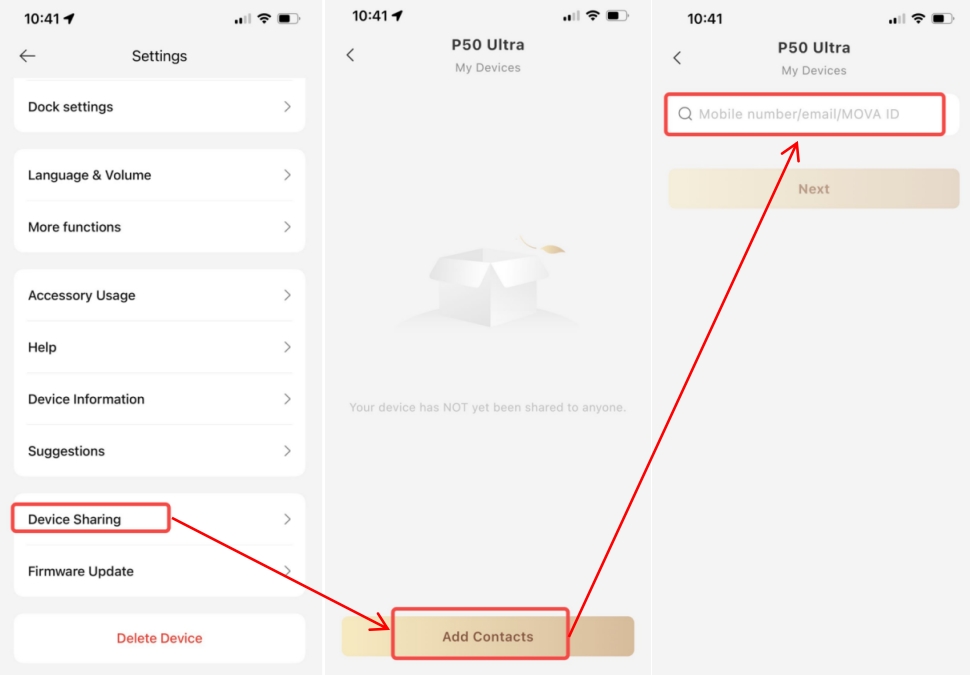
If the above steps fail to fix the problem, please provide your current firmware version and device SN, and share your device to our account: BD929781. Our technical team will check your device issue and get back to you. |  US
Translate
US
Translate



 1348
1348