Hi there,
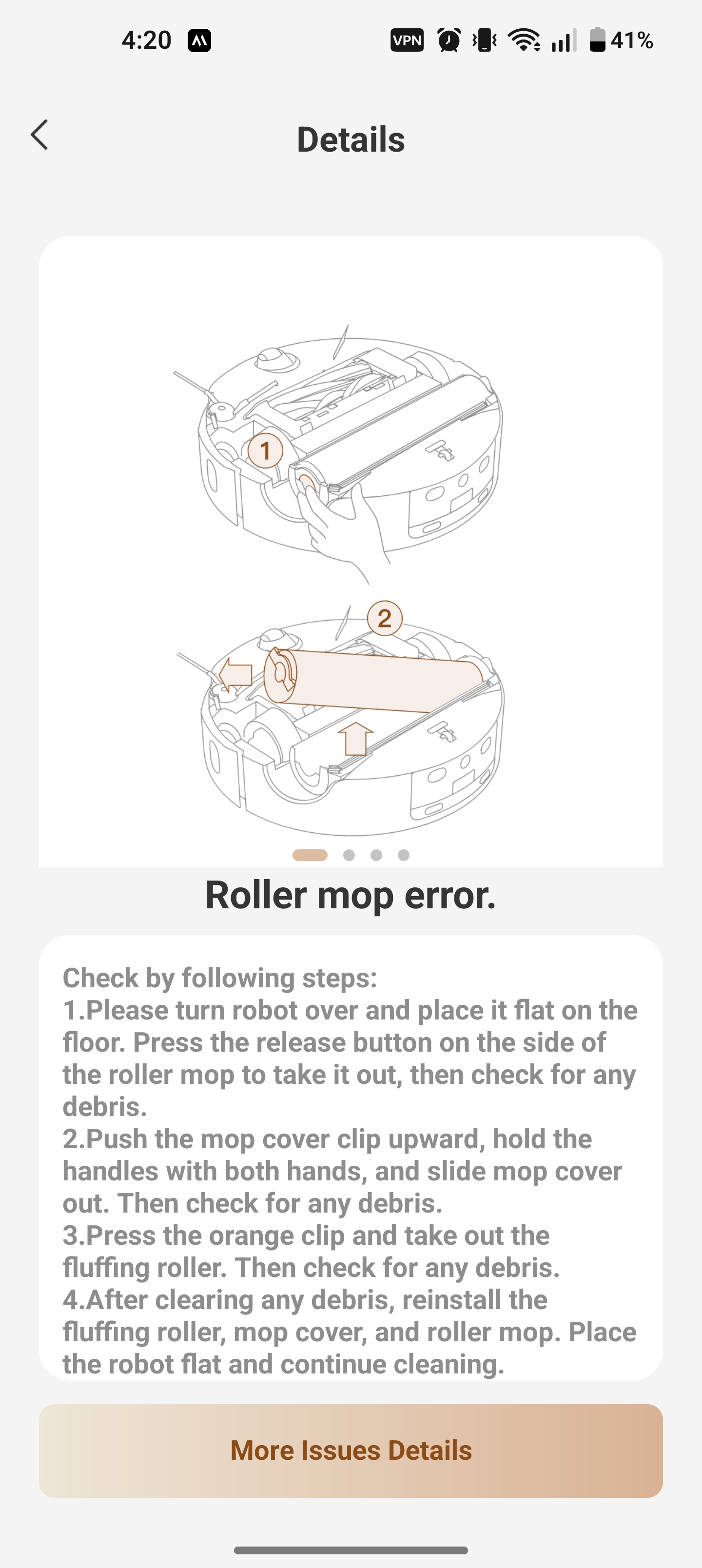
This error about the stuck roller mop cover usually happens when dirt and grime build up over time after long-term use. The roller cover on your unit is fully detachable for easy cleaning, please follow these steps to troubleshoot:
Refer to the disassembly diagram at the bottom of the robot. Slide out the orange lock buckle on the right side of the roller compartment. Grab the two side handles of the roller cover and pull it straight out.
Thoroughly wash all crevices and gaps on the roller cover with cleaning tools. Once fully cleaned, reinstall the cover and slide the lock buckle back into the locked position.
If you don’t have any carpets at home, you can also remove and store the roller cover separately without it.
If the error still pops up after cleaning and reinstalling, please reach out to our customer care team for further after-sales support.
Customer Care Hotline: +1 (888)308-6159
Working Hours: Monday to Friday, 9:00 - 18:00 EDT
Closed on Saturdays, Sundays and public holidays
Support Email:
support@mova-tech.com
If you do not want to disassemble the device by yourself, please share the device to account WN152837 and provide the SN code. Our technical team will remotely check the device status and give you feedback. If it is confirmed to be a device failure, we will properly handle the after-sales service for you.
 US
Translate
US
Translate




 1724
1724