NA567995

[V50 Ultra Complete] Mova V50 Ultra Complete

after I placed my new just purchased robot upstairs, joined network and remapped, it worked fine for 1 day...then today it would not clean the 2 rooms I selected....it would only clean the hall...I had it return to the dock and restarted to clean bath only....it came out and cleaned the hall only....I tried the MB and bath only and it cleaned only the hall....finally I tried the bath only.....the robot came out and started, but stopped and said "cannot proceed to the speficitf room, move obstacles"...there is 4 feet in front of the dock, only carpet.....this has been going on for 6 times...finally I reset to factory setting and set wifi to 2.4ghz....I manually tried to add but it kept telling me to scan the code....but I was in manual adding mode....it will not go to "connecting devices" page and I cannot get it to connect to the dock...

can you please assist me and tell me how to reset to factory so I can join network?   my other unit had no trouble connecting....here is what I do:

        1..open app and select "add manually"
        2..select "V50 Ultra Complete"
        3..add "network and password", press "next"
        4..place robot next to dock and press the power button to turn on....when it turns on, I press the "dot" and the "next" button
        5..press the "power and Dock buttons together" for 3 seconds and when I hear "waiting for configuration"....when I hear that I press the "dot" and the next button
        6.. then I get the "QR CODE" telling me to scan the code, but when I do, it takes me to the app page a I never hear" configuring the network...
Sometimes i can get to connecting page but never get the 3 green dots...

I dont know what to do please help me......thank you
Translate
You need to log in to reply. Login | Register

2 Comment

setfactory.png
Last edited by Mova Support US on 2026-8-20 12:57

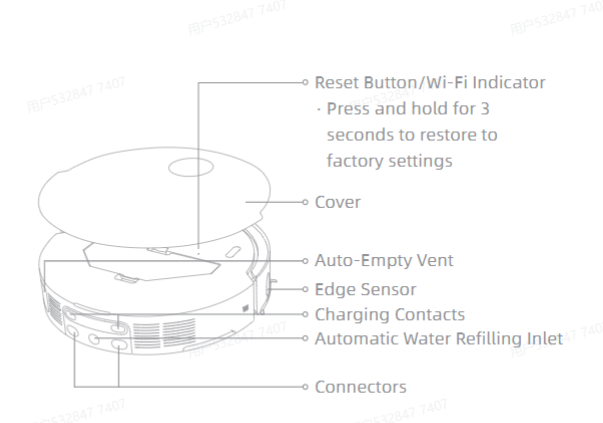
Hi there. This is the Reset Button / Wi‑Fi Indicator. Please press and hold it for 3 seconds to restore the unit to factory settings.If you still cannot get it to work after following the steps above, please contact our after‑sales team for further solutions. Normally, you should not run into network‑configuration failures with proper operation. Should you encounter any abnormalities after resetting the robot, feel free to reach out to us anytime.
2026-8-20 12:53:19 US Translate

that you....after 3 hours of troubleshooting and resetting the robot many times, resetting the router and insuring it was set to 2.4ghz, I decided not to use the "+" to add new robot...I turned everything off and turned back on, and used the rest button....I then chose to add robot by using the scanning QR code and magically I heard the correct messages, it allowed me to pair with phone using the bluetooth and it connected and I had 3 green dots..wow....I was so frustrated but seems to work now
 
2026-8-21 02:33 US Translate
UID:NA567995 US
  • 58Posts
  • 0Friends

© 2026 MOVA Forum All Rights Reserved | Support by Discuz! X5.0 Font by MiSans

Quick Reply Back to Top Return to List