NA567995

[V70 Ultra Complete] V70 Individual Carpet Settings

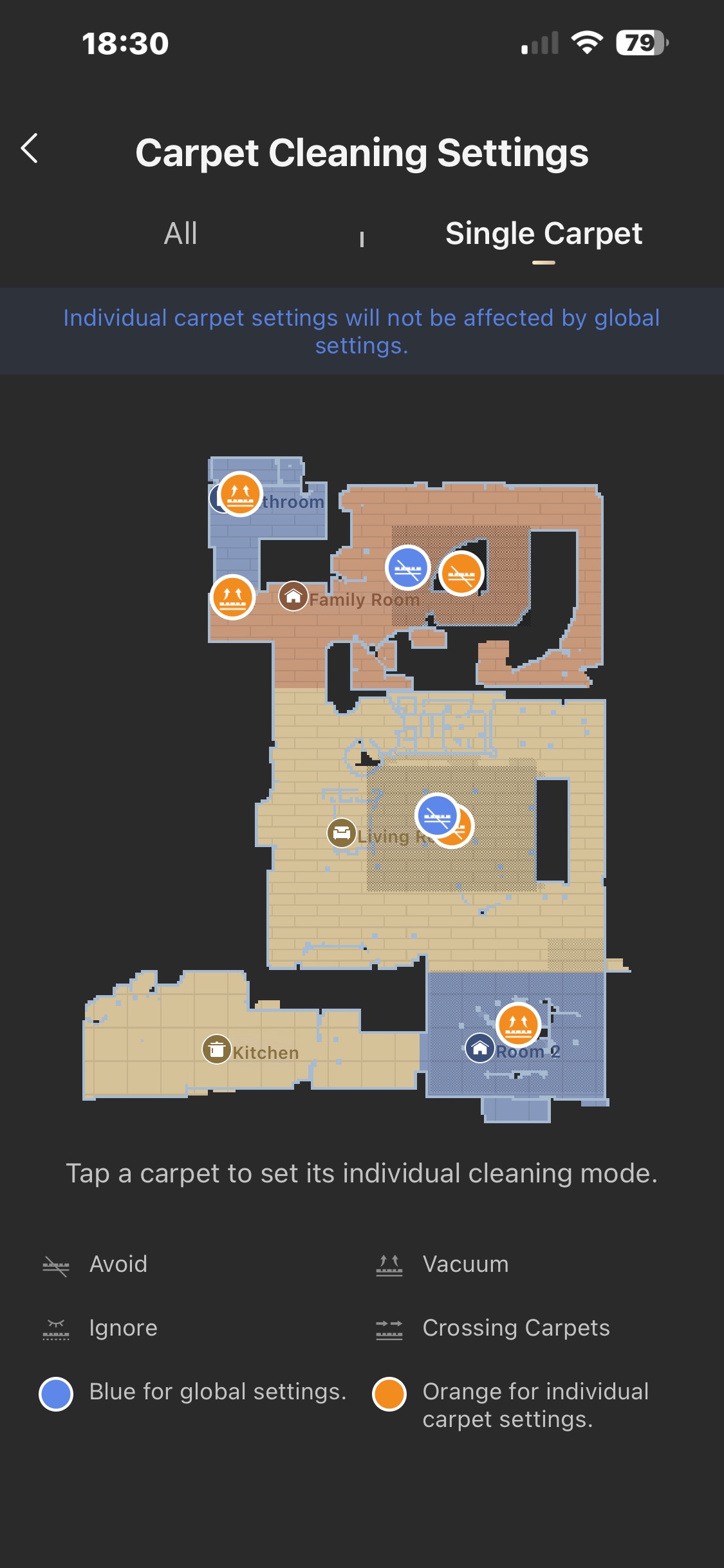
I am having trouble with carpet settings....I see that carpet cleaning settings has " ALL " and " Single Carpet" settings....I have a room the has two carpets.....I want to NOT vacuum one carpet and vacuum the SECOND carpet....

In the Single carpet, I set the orange vacuum setting for the carpet I want to clean.....and set the orange AVOID setting for the carpet I do not want to clean...

my problem is, it will not clean the carpet I want it to...

So I would like to know how to turn off all settings in the "Single Carpet" mode....and just use the "All" mode and control carpet cleaning that way......or clear all setting in the carpet cleaning setting mode...thanks

Translate
You need to log in to reply. Login | Register

4 Comment

Hello, could you please provide a screenshot of your current carpet‑setting page as well as your device SN serial number? This will help us locate and analyze the issue.
2026-9-14 13:26:40 US Translate

NA567995Thread Starter
My current carpet cleaning setting is at "ALL" and the mode is set to "Avoid".....this way I can clean all rooms without the robot vacumming any carpet in any room.....I understand how these work.....

I want to be able to set up 1 room that has 2 carpets and be able to clean one carpet and not clean the second carpet....I am confused how to set this up.....

Should I use the "Single Carpet" setting and pick either orange or blue dot and what I want?   if so, how do I know which room it will work on....
2026-9-14 13:42:25 US Translate

Hello. If you want to clean only one carpet in a room while skipping the other, long-press the carpet you wish to clean. A settings menu will pop up, allowing you to configure it for cleaning individually. You can tap and long-press each carpet on the map to set different options for every carpet.
2026-9-14 17:38:08 US Translate

thank you I'll try this...
 
2026-9-15 01:49 US Translate
UID:NA567995 US
  • 58Posts
  • 0Friends

© 2026 MOVA Forum All Rights Reserved | Support by Discuz! X5.0 Font by MiSans

Quick Reply Back to Top Return to List