LR378742

Maps and mapping

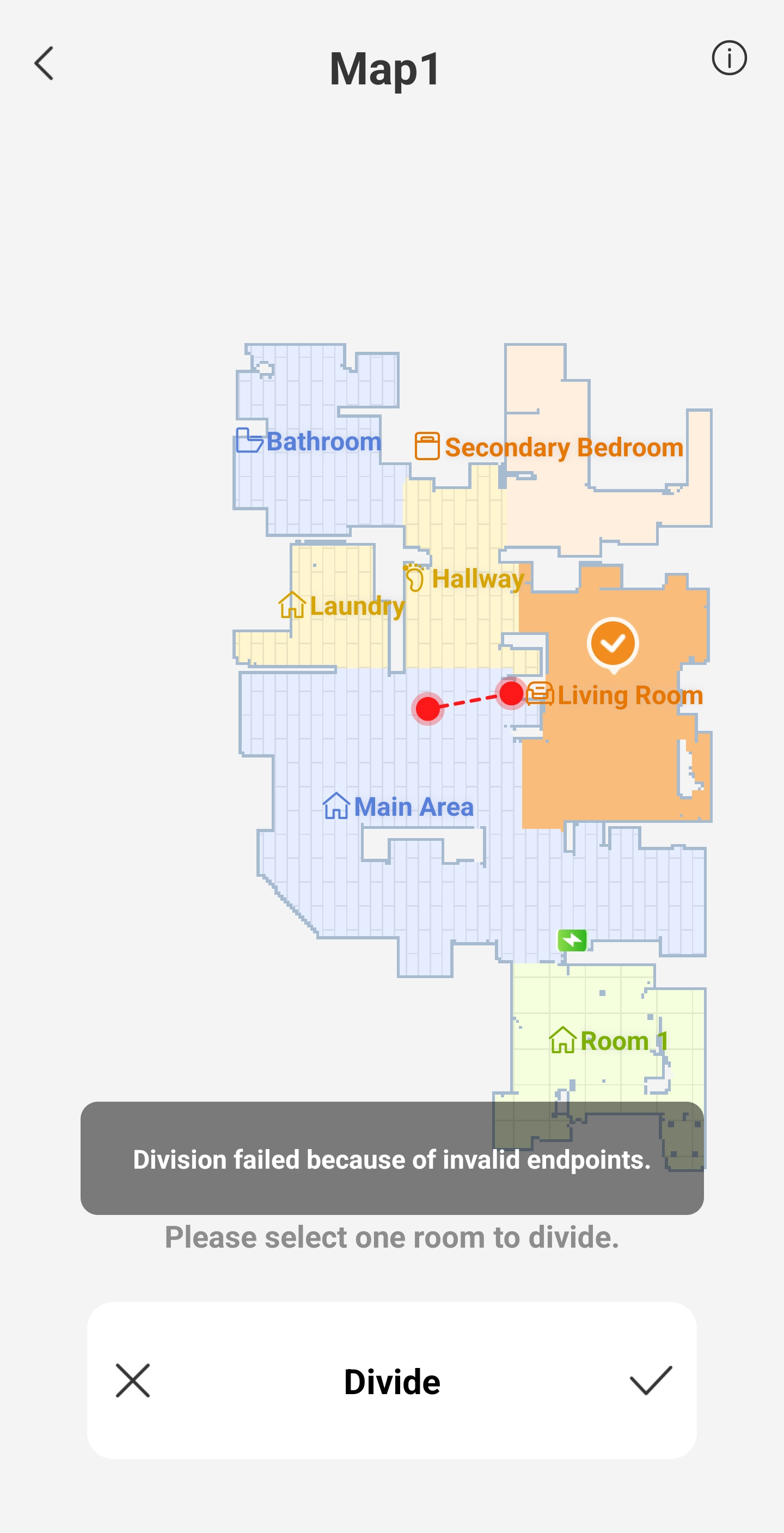
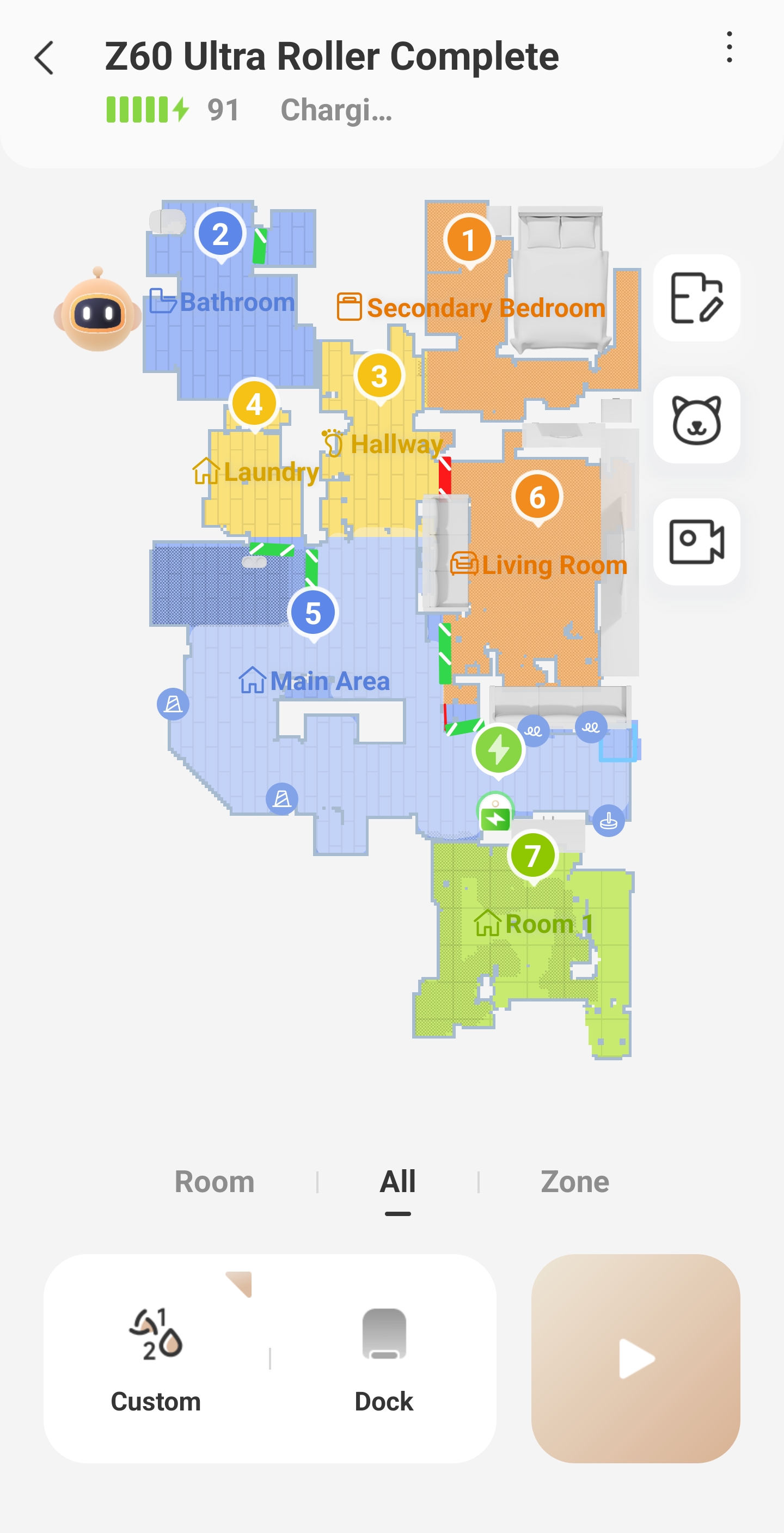
I will say that the unit does a pretty good job of the initial mapping. As long as you do your part and make sure things are picked up doors are open lights are on I think it is quick and fairly accurate to the open space in each room. There are quite a few options in the mapping program to put in furniture and throw rugs and select a couple different floor types among other things. The one thing that I have had issue with on everyone of my mova units, and at this point I have had four of my own and I have assisted six other people, is in drawing a room divider. For instance I have a larger open area for my kitchen, dining room, and living room. If I want to put a divider into a room it is simple as long as I am going from one solid surface to another solid surface in the room. The challenges if I wanted to carve out say two sides of a square where one side would connect to a wall but the other needs to stop in the middle of the floor. When you try to stop it in the middle of the floor you get an error message, "division failed because of invalid endpoints". I know that one of my endpoints is in the middle of a floor but that's because I want it to stop there so that I can connect to that endpoint and go a different direction to another wall so that I can carve out a section for my living room or dining room division. The way I got around it was that I had to physically build a wall with large boxes and then remap so that it looked like there was a division. Once it looked like I had a solid division then I could draw lines and it would accept them. In theory we should be able to draw a room divider anywhere in the room and it shouldn't have to connect to something solid. I do know that I have had some responses from the technical team on a few things like it not getting up along edges very well or not edging around a throw rug well and they were giving suggestions about changing mapping and mapping settings. While I appreciate them getting back I also look at it from the standpoint that a lot of people I know who have robotic vacuums are not people who are necessarily computer experts. Messing around with settings to try to change things would not be in all of their best interest. Having something that was a little more intuitive especially when it talks about the fact that the robot vacuum can learn, would be great. If it could do a better job over time of sensing where edges are and making adjustments on its own to find those edges more accurately, I think that would be awesome. I will say that the first time I got a unit it took me probably 2 hours from unbox to getting it all set up and connected to the internet and the mapping done and adjusted. By the time I've gotten my fourth and 5th that I've helped people with I can have it out of the box set up and the mapping done typically in less than an hour. Again overall I think it's a very good unit and I point out some of the more detailed issues that I've seen simply in the hope that it can help someone else.
You need to log in to reply. Login | Register

1 Comment

Hello,

Thank you very much for taking the time to share such a detailed and thoughtful review of your experience.

We truly appreciate the level of detail you provided, especially regarding the mapping process and room divider functionality. Feedback like yours is extremely valuable to us, as it helps us better understand real-world usage scenarios and areas where the experience can be improved.

Please rest assured that we will share your suggestions and observations with our product and development teams for further evaluation and future optimization. We are continuously working to make our products more intuitive and user-friendly for all customers.

Thank you again for your support and for helping us improve by sharing your experience.
2026-3-30 12:38:48 US Translate

UID:LR378742 US
  • 14Posts
  • 0Friends
Privacy Policy|Terms of Use|Archiver|Mobile|DarkRoom|Software License and Service Agreement

© 2026 MOVA Forum All Rights Reserved | Support by Discuz! X5.0 Font by MiSans

Quick Reply Back to Top Return to List