NA567995

[V50 Ultra Complete] Navigation Issues: Making rooms where there are none

Last edited by NA567995 on 2026-8-30 12:19

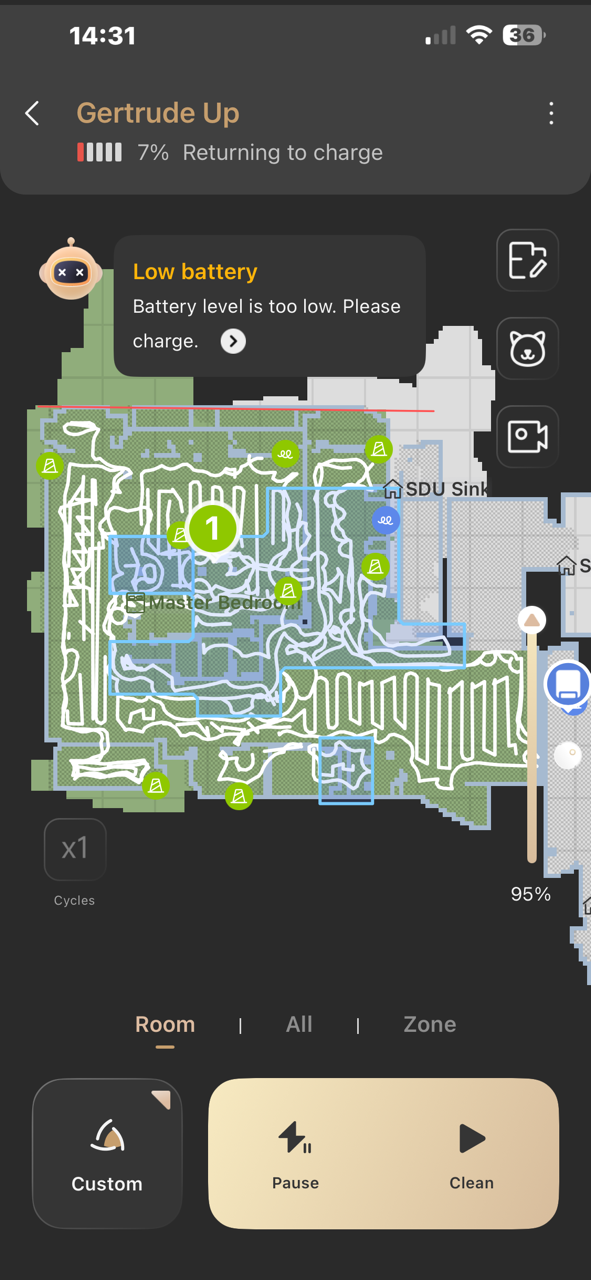
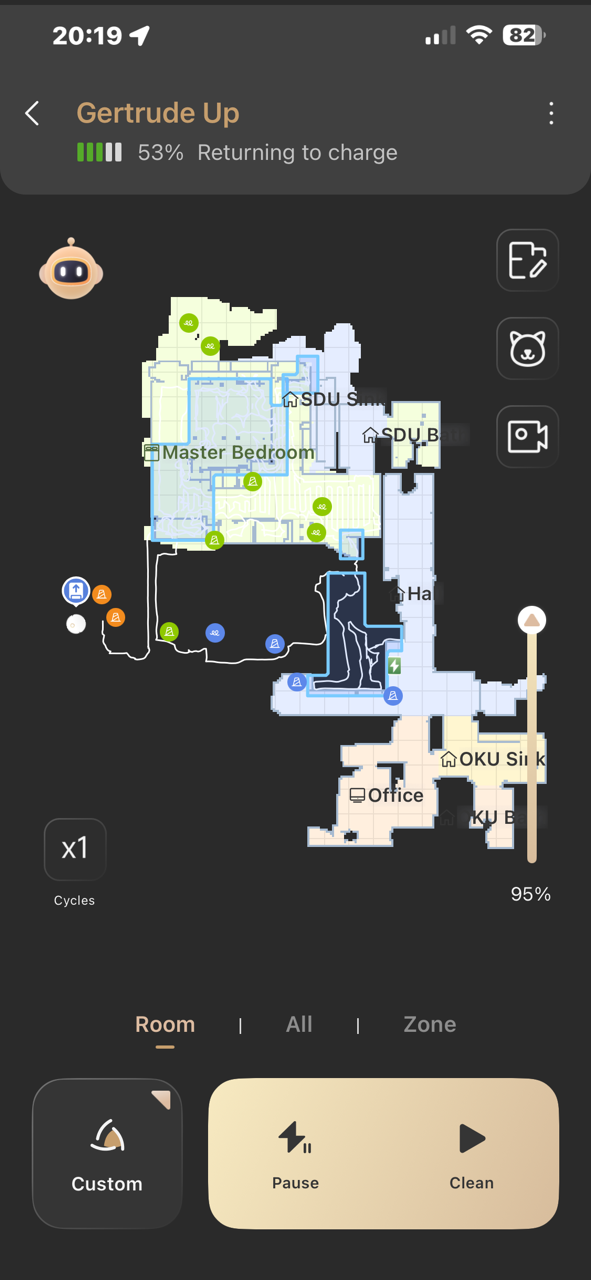
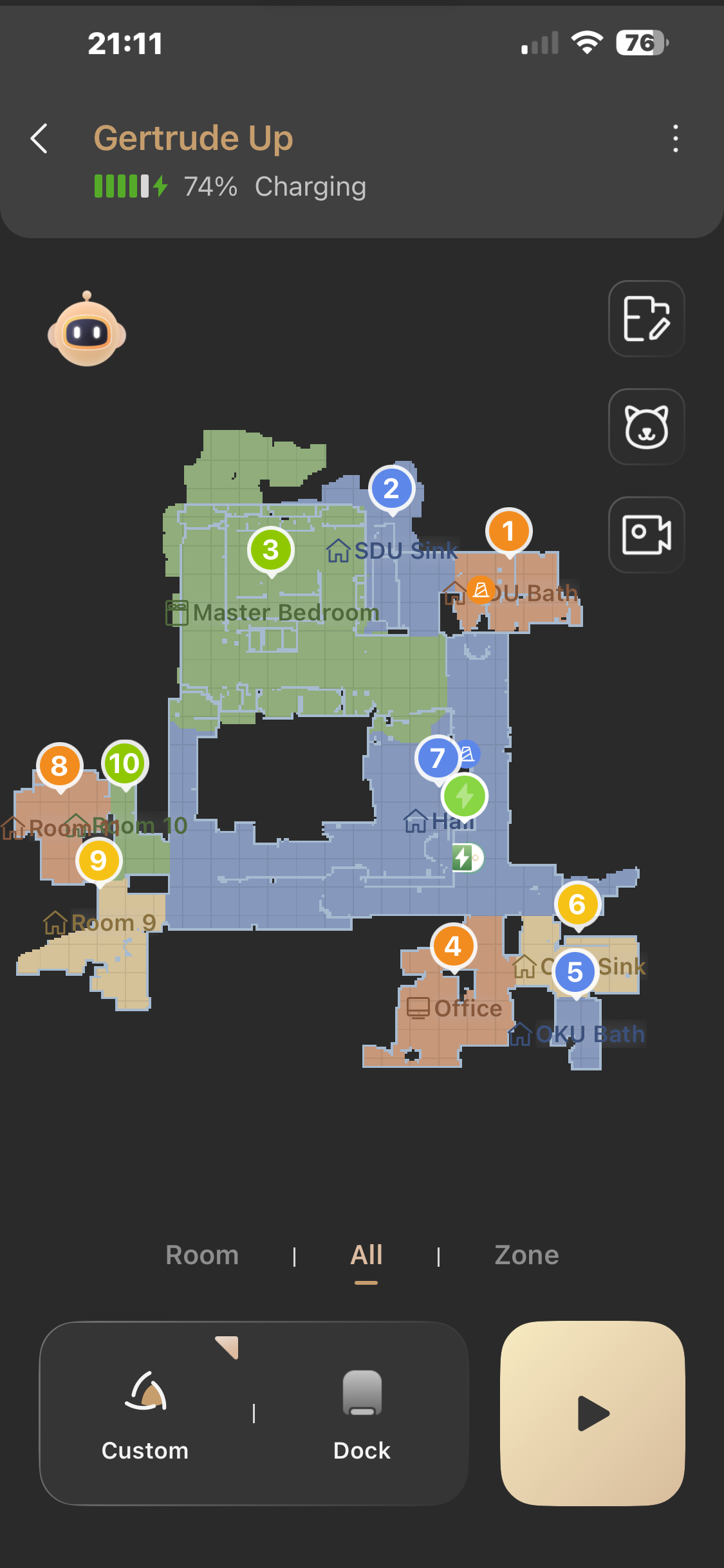
My Mova V50 has an issue with navigating my master bedroom.....we have a bed, 2-nightstands and 2-dressers.....the unit initially mapped all of the room correctly with exception of making room over there staircase....I was able to hide that room.....initial cleaning was done and all was fine....the robot navigated all rooms fine and went back to the dock....but the second time I tried to clean master bedroom, the robot started out good but then it went crazy and went outside the room walls into "space" there was outside the house....It created extra rooms where there were none....there is 2 inches of clearance under the bed, nightstands and dressers.....it goes under one dresser, but would not go under the other dresser even though it is 12" away....and then would not return to the dock to charge when it reached 7% of charge left....I ended the cleaning and sent it back to the dock, but it went by the dock and started cleaning other rooms it has just created that did not exist....I have attached several pictures of the issue...

After it charged for 20 minutes, I sent it to the SDU Sink room....it cleaned it but did not go under the vanity or even make an attempt to go under it....there are 2 inches of clearance under the vanity....it used to go under it with no problems...

Should I power it down and turn it back on, turn dock and robot off, then turn them back on or should I do a re-map.....

the last photo shows room 3 with space outside the wall....that area is on the outside of the house.....rooms 8,9 and 10 were added incorrectly....they are outside the exterior wall of the house....room 2, has a vanity that is not captured as low-clearance and the top of the room is outside the wall like room 2..

please advise.....thanks you
Translate
You need to log in to reply. Login | Register

6 Comment

Please kindly check whether there is a map overlay issue and try to update to the latest complete map.

In addition, please check for glass, mirrors or other highly‑reflective objects in the room. If present, move them out of the robot’s working area, as such items will interfere with device detection.

If ghost virtual zones only appear near reflective surfaces while the rest of rooms work normally: go to **Edit Map → Room Partition → Split**. Divide the unwanted ghost virtual areas into independent sections, select these sections and hide them.

Regarding the robot being unable to get under the other dresser and the vanity: please confirm if the clearance height under the furniture is between **89.5‑98 mm**. If so, you can turn on the **Deep‑Clean** function to allow the robot to clean low‑clearance spaces.
Note: uneven surfaces or protrusions under furniture may scratch the top of the robot. Please make sure the bottom of furniture is flat and smooth before enabling this function.

Strong light and highly‑reflective objects may cause map anomalies. We recommend closing curtains or running cleaning in soft‑light conditions. For reflective items, keep their bottom at least 15 cm above the ground.

Please wipe the navigation sensors regularly with a soft cloth. You may restore the device to factory settings and remap your home. Make sure all passages are clear before mapping. Move obstacles such as chairs aside for better ground scanning. This step may be a little troublesome, yet it helps achieve accurate mapping.

If the problem persists, please provide the device SN, upload problem logs (Me → Help & Feedback → Upload Problem Logs), share your device (Settings → Device Sharing → Add Contact → Enter account ID → Next). Please send us the fault video and exact failure time via private message for further technical analysis. Thank you for your understanding and cooperation.
2026-8-30 14:50:21 US Translate

thank you.....other rooms clean ok..we have stand-up mirror in MasterBedroom...thats where the area is bad...will remove or cover up the mirror...robot has 2" above the already extended Lidar when going under the dressers, bed and nightstands...there is approx 4.25" clearance from ground to bottom of furniture...I will try "deep clean" mode and see if things are better...I will try to clean again with these changes...I did move a chair and sif it works, I know what is wrong and will not re-map..
 
2026-8-30 17:40 US Translate
Alright, please feel free to contact us if you encounter any further issues. We recommend reaching out via private message to avoid missing your message. Thank you for your cooperation
2026-8-30 17:46:11 US Translate

hi...I was able to restore a mapped have cleaned 2 rooms....the robot did well and put carpet down...I will do the hall, master bedroom, master sink and master bath tomorrow....I will cover the mirror and remove stool and chair....it will be interesting to see if carpet gets laid down and it robot goes under furniture...I will advise and if have issue will contact with pix, screen shot and video if I can figure out how to send it to you....can you use drop box?
 
2026-8-30 19:11 US Translate
Hello, you may try generating a share link via Dropbox and send it to us. If this does not work, you can also send us the video file directly.
2026-8-31 11:56:29 US Translate

hi...just getting back from weekend trip.....will try and make video and send via drop box...where do I send it?.....I will also take some pix as well....all upstairs rooms seem to be mapped well and clean well....the only one having trouble at this time appears to be the master bedroom.....I believe you are correct about the mirror.....I will cover it or move it and advise....
 
2026-9-1 01:42 US Translate
UID:NA567995 US
  • 58Posts
  • 0Friends

© 2026 MOVA Forum All Rights Reserved | Support by Discuz! X5.0 Font by MiSans

Quick Reply Back to Top Return to List