Hello,
The robot will refill its internal water tank after mopping. You can manually click "Dock" and then the "Wash Mop" button to refill the robot's internal water tank.
If the robot is not dispensing water while mopping, it might be due to a blockage in the water outlet. We suggest checking the following steps:
After the mop pad cleaning is complete, remove the mop pad from the mop pad holder and install only the mop pad holder back onto the robot. Start a mopping task from the dock, wait for 5 minutes, and check if there are water droplets on the floor.
If there are water droplets, it indicates that the robot is dispensing water normally. Please increase the mop washing frequency and mop humidity.
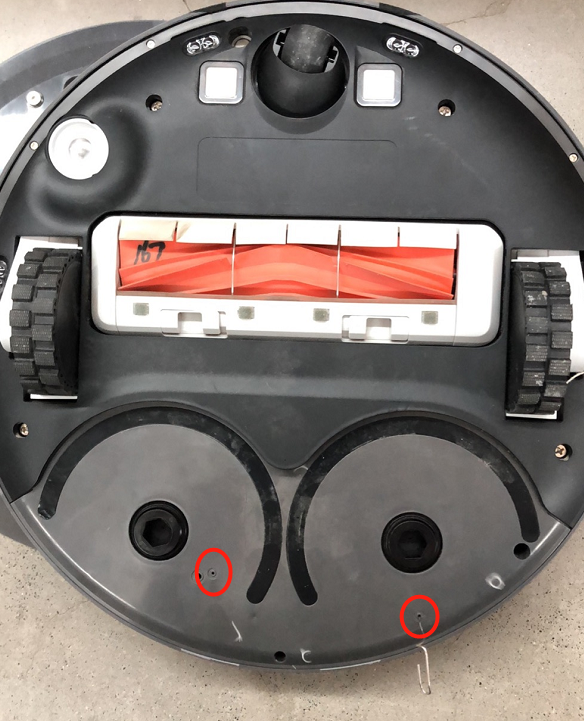
If no water flows out during the above test, remove the mop pad holder and use a wire, toothpick, or other object to poke the water outlet on the bottom of the robot (refer to the attached image). Check if the mopping issue has been resolved.
If your problem is still not resolved, you may need to contact our customer service department for further assistance.
Customer Care: +1 (888)308-6159
(Mon. to Fri. 9:00-18:00 EDT
Sat. & Sun. Holiday)
Email:
support@mova-tech.com



 2061
2061

 US
US






