Dear user, let me first confirm that the machine you are using is the movaP10 Pro ultra, a robot vacuum cleaner, right? If the message is: "We suggest you check the following to determine if the device is currently offline:
1. The APP cannot connect to the machine when it is powered off.
2. The machine's online/offline status is related to the network signal strength at the robot's location. If the network signal is weak or unstable, the robot may go offline.
3. There is no network connection on your home Wi-Fi.
You can try the following solutions:
1. Check if the machine is powered off. If it is, press and hold the power button to turn it on and re-configure the network.
2. If the machine is offline during normal operation, it will not affect the machine's ability to complete previous cleaning tasks. The machine will automatically return to online status once the network signal is better.
3. You can add or reset the network for the machine, selecting a router close to the machine for network configuration.
4. Check if your home Wi-Fi is working properly. If the Wi-Fi is faulty, repair your home network and re-configure the network.
5. Please check if 5G preference is selected in the machine's network configuration settings and disable it.
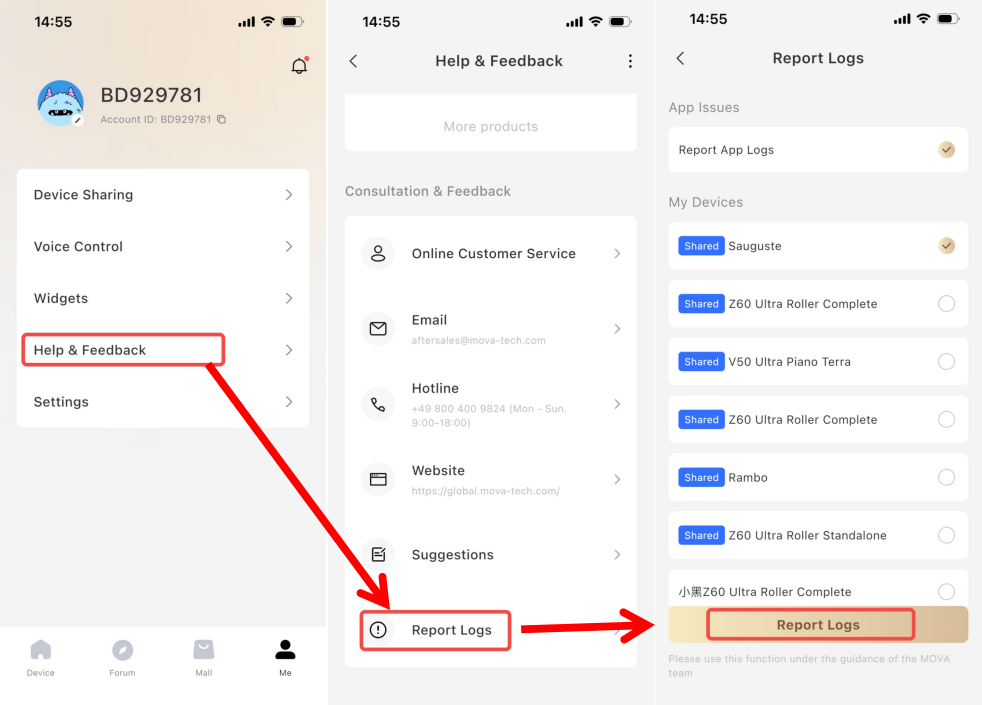
If you still have questions, please upload your question to the problem log. The specific operation path is shown in the image."
Customer Care: +1 (888)308-6159
(Mon. to Fri. 9:00-18:00 EDT
Sat. & Sun. Holiday)
Email:
support@mova-tech.com




 2898
2898

 US
US






