Hello OS677462,
We apologize for the inconvenience caused. Please follow the troubleshooting steps below:
Go to the "Automatic Emptying" settings and check the auto-empty frequency. The robot will automatically suck dust according to your set frequency.
Check if Do Not Disturb mode is enabled. When this mode is on, the base station will not run automatic dust collection. Go to "More Features" to turn off DND mode and try again.
The robot needs to show "Cleaning task completed" and return to the charging dock on its own. If the battery level is too low or there is manual interruption during charging, automatic dust collection will not trigger.
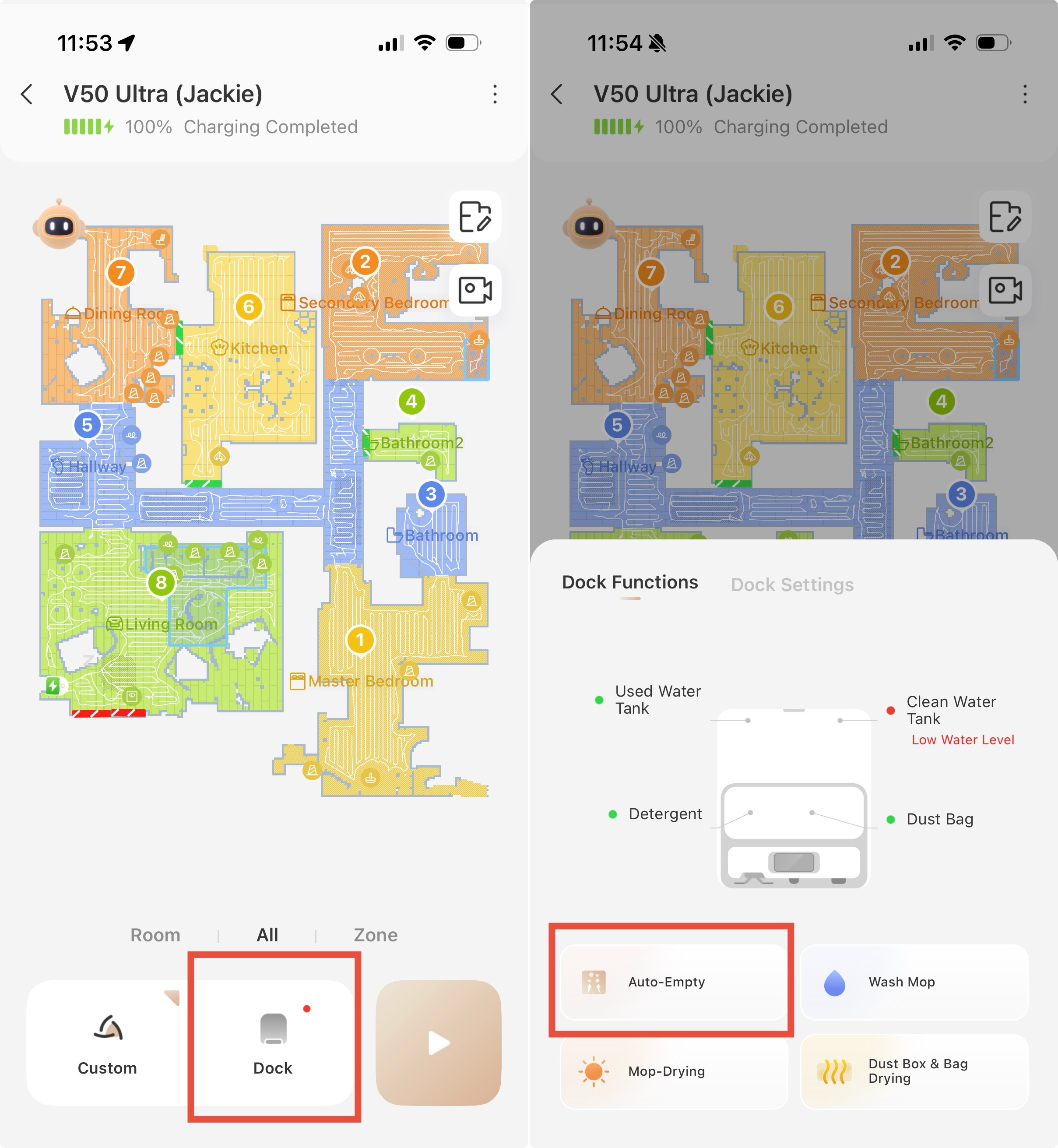
After cleaning finishes, you can manually tap the Dust Collection/Auto Empty button in the App to test if the dust collection function works.
If the dust collection activates yet dust cannot be sucked away:
Check whether the outlet of the dust bin is tangled with hair. Fluffy hair and lint are hard to extract, clog the air duct and affect fan performance. Please clean this area manually. Meanwhile, we suggest increasing cleaning and auto-empty frequencies to reduce dust buildup.
If the issue persists, please send a fault video, the device serial number and your purchase invoice to customer service for further support. Email:
support@mova-tech.com US
Translate
US
Translate



 1407
1407