Paul H.

[P10 Pro Ultra] Map

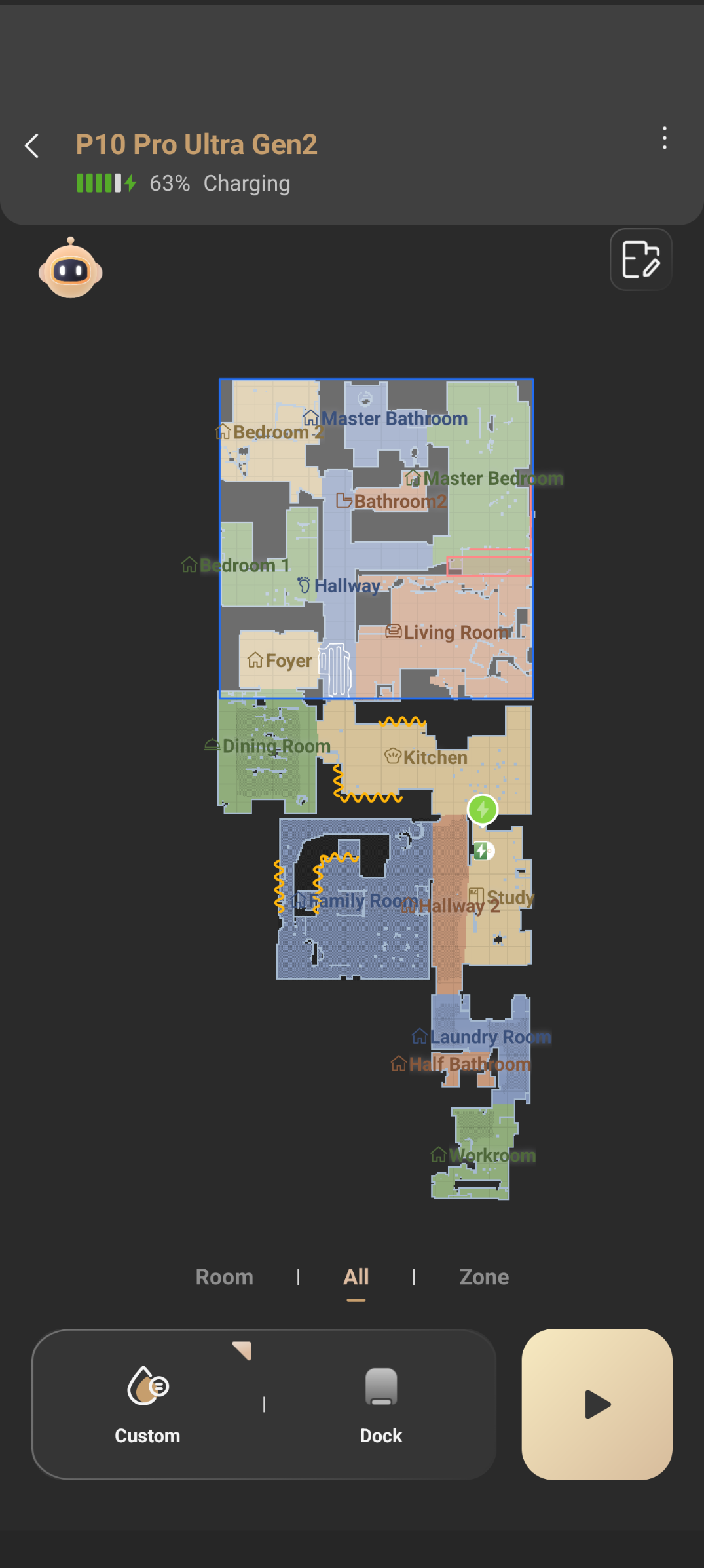
I seem to have a zone configured that shows on the all tab.  I switch to zone and there are no zones drawn that I can delete.  The selected area does not show on the map when I choose room.  How can I remove this selected/drawn area?  I have included a picture.
Translate
You need to log in to reply. Login | Register

3 Comment

Good morning, we apologize for the confusion. We have received your attached photos. Could you let us know which area you want to delete? Is it the marked low area that cannot be removed, or do you wish to delete one of the divided zones after partitioning an area? We look forward to your reply.
2026-7-12 17:20:10 US Translate

Paul H.Thread Starter
It is the blue square at the top of the map that encompasses 8 separate rooms.  Thank you.
2026-7-13 00:02:09 Translate

Hello, please restart your device, clear the cache and check your network environment. On the zone page, tap Add Zone on the right, then drag to frame the area where you want to create a new zone. To delete a zone, select it and click the delete icon at the top left. For example, go to the zone tab, select Foyer, then tap the delete button in the upper left corner to remove it; the operation is the same for all other zones. If you still cannot operate normally, please record a video showing the
 
2026-7-13 12:43 US Translate
UID:KB046346
  • 6Posts
  • 0Friends

© 2026 MOVA Forum All Rights Reserved | Support by Discuz! X5.0 Font by MiSans

Quick Reply Back to Top Return to List