|
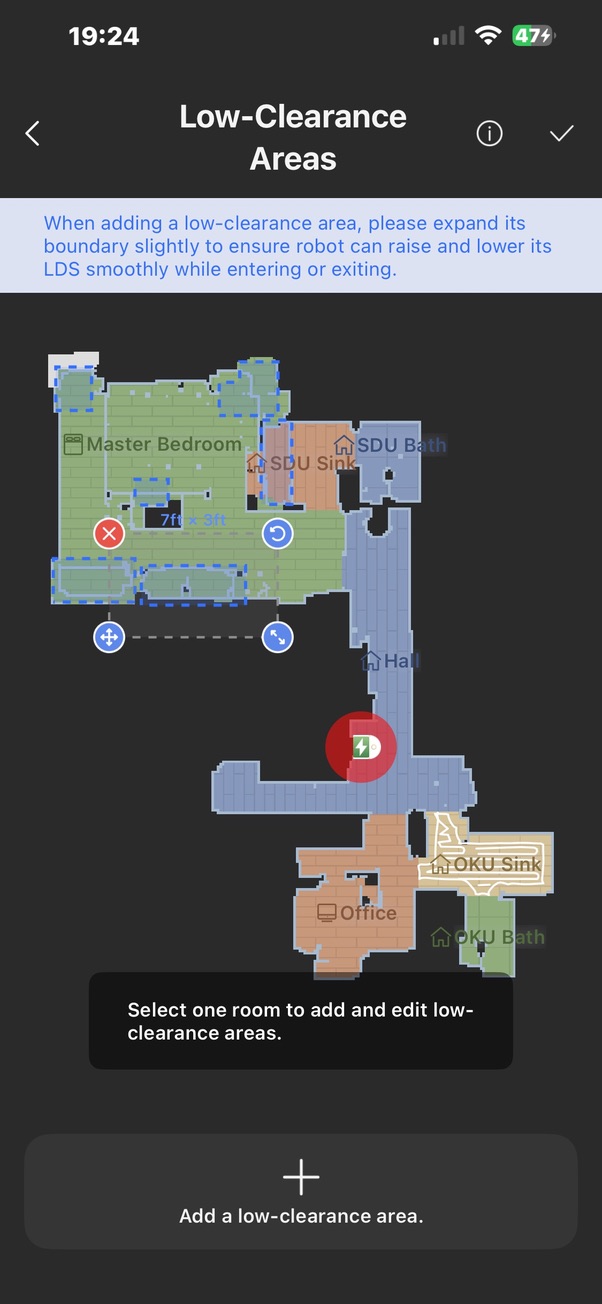
Hello, we apologize for the inconvenience. I fully understand that being unable to manually add low‑clearance borders, getting prompted to select a room in the app with no response after tapping the target room, and the robot automatically generating incorrect low‑clearance areas that can only be deleted but not manually added, has caused you significant trouble. Thank you for already powering off the robot and the docking station, and running a cleaning cycle with a successful return‑to‑charge. You may also make sure your MOVA app and robot firmware are updated to the latest versions, then clear the app cache. In the MOVA app, go to "Me", open Settings and enter the General section. Locate the Clear Cache option, tap it and confirm the operation. If the issue persists, please provide the time of the failure, relevant photos or videos, upload your device logs, share your device SN and firmware version, and share your device to UID: QR033438. Our backend R&D team will conduct a detailed investigation to identify the root cause. We hope your problem gets resolved soon and look forward to your further reply. | 

 US
US


 347
347